


Qianli iP66 Battery Adhesive Removal Tool
Features:
IP66 Battery Adhesive Quick-Removal Cable: Designed for fast and efficient battery adhesive removal.
Built-in Safety Features: Includes current limit protection and a status LED indicator.
No Fast Charging Required: Operates with a 5V input and outputs 25V, with a 30mA current limit to prevent short-circuit damage.
LED Indicator Guide:
Green Light (On): Device is powered on but not in operation.
Purple Light (Connected): Device is actively electrolyzing the adhesive using a high current.
Red Light (Removable): Current has decreased, and battery removal is now possible as the adhesive's viscosity is reduced.
Green Light (Easy Removal): Current is nearly zero, meaning the adhesive is almost completely ineffective for easy battery removal.
Usage Steps:
1- Connect the Type-C cable; the indicator will turn green, signaling power-on.
2- 5V Input Compatibility – Works with various power sources, including standard USB ports.
3- When connected, the indicator turns purple, meaning the device is actively electrolyzing the adhesive using a significant current.
Note: Ensure the positive clip is attached to the battery adhesive strip. Incorrect placement may leave residual adhesive on the phone’s back cover.
4- Wait for the indicator to turn red, which means the current has decreased and battery removal is now possible as the adhesive’s viscosity is reduced.
5- When the indicator turns green again, the current is nearly zero, signaling that the adhesive is almost entirely ineffective, allowing for easy battery removal.
All trademarks are the property of their respective owners and are used solely to identify compatible products. Such use does not imply affiliation, authorization, or endorsement by the trademark owner.
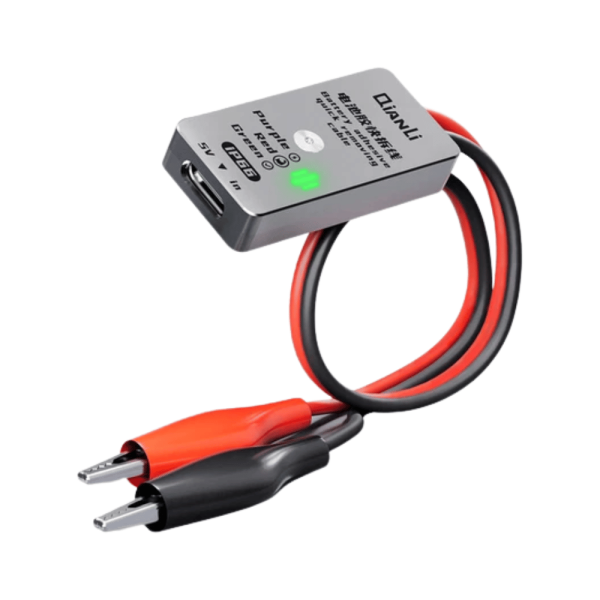

Features:
IP66 Battery Adhesive Quick-Removal Cable: Designed for fast and efficient battery adhesive removal.
Built-in Safety Features: Includes current limit protection and a status LED indicator.
No Fast Charging Required: Operates with a 5V input and outputs 25V, with a 30mA current limit to prevent short-circuit damage.
LED Indicator Guide:
Green Light (On): Device is powered on but not in operation.
Purple Light (Connected): Device is actively electrolyzing the adhesive using a high current.
Red Light (Removable): Current has decreased, and battery removal is now possible as the adhesive's viscosity is reduced.
Green Light (Easy Removal): Current is nearly zero, meaning the adhesive is almost completely ineffective for easy battery removal.
Usage Steps:
1- Connect the Type-C cable; the indicator will turn green, signaling power-on.
2- 5V Input Compatibility – Works with various power sources, including standard USB ports.
3- When connected, the indicator turns purple, meaning the device is actively electrolyzing the adhesive using a significant current.
Note: Ensure the positive clip is attached to the battery adhesive strip. Incorrect placement may leave residual adhesive on the phone’s back cover.
4- Wait for the indicator to turn red, which means the current has decreased and battery removal is now possible as the adhesive’s viscosity is reduced.
5- When the indicator turns green again, the current is nearly zero, signaling that the adhesive is almost entirely ineffective, allowing for easy battery removal.
All trademarks are the property of their respective owners and are used solely to identify compatible products. Such use does not imply affiliation, authorization, or endorsement by the trademark owner.
| Barcode | 655368208034 |
|---|---|
| Description | Features: IP66 Battery Adhesive Quick-Removal Cable: Designed for fast and efficient battery adhesive removal. LED Indicator Guide: Green Light (On): Device is powered on but not in operation. Usage Steps: 1- Connect the Type-C cable; the indicator will turn green, signaling power-on. |